Track your weight in stones and pounds
Cave Cals counts calories and tracks your weight in stones and pounds, the way many people in the UK say it: 12 st 4 lb, not 172 lb or 78 kg. Weigh-ins, your goal weight and setup all use it, on iPhone and Android, and weight tracking is free.
How it works
- On a phone set to UK measurements, Cave Cals starts in stones. Anyone can switch: on the Me page, with Track weight on, pick Stones (st), Pounds (lb) or Kilograms (kg).
- Setup asks for stones and pounds. Pick st / ft and enter your current and goal weight in st and lb boxes; your calorie plan is worked out from them.
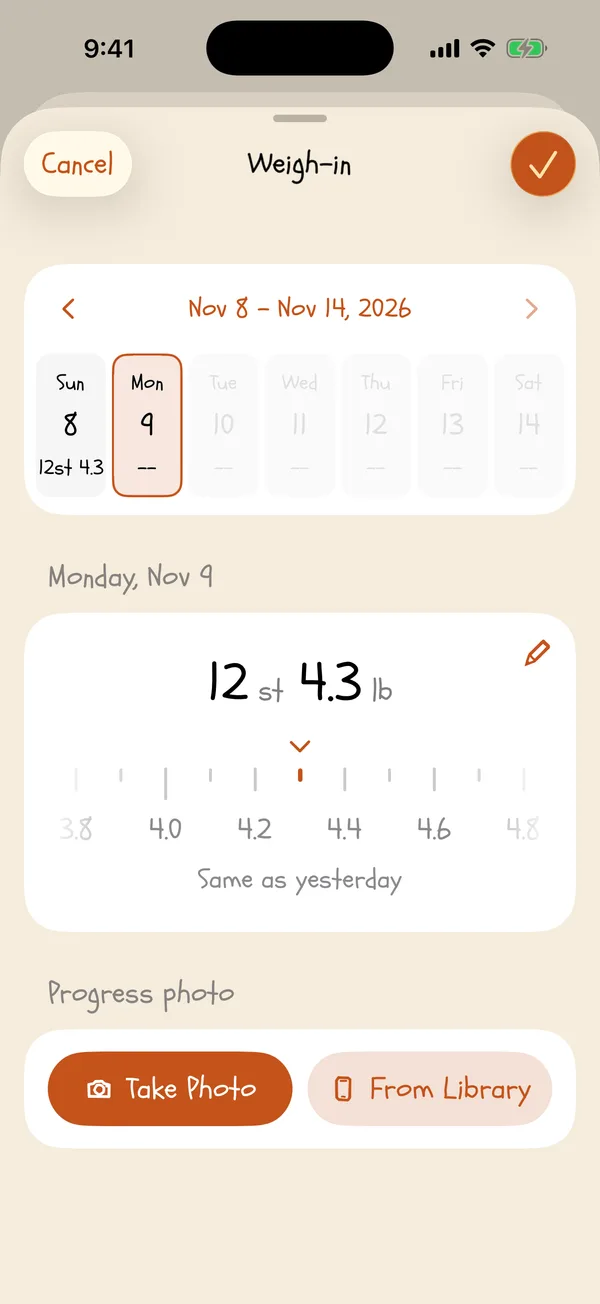
- Weigh-ins use a dial in tenths of a pound, with every whole stone labelled, and save one reading a day.
- Changes read naturally: "2.6 lb" until you've moved a whole stone, then "1 st 2.6 lb".
Weights are stored exactly, so switching units never rounds your history.
Calories in stones?
There's no such thing as calories per stone, but your calorie target depends on your weight. Cave Cals works it out from the weight you enter in stones, and the goal weight by date calculator shows the same maths (enter pounds there: 1 stone is 14 lb).
Is it free?
Yes. Weight tracking, weigh-ins, goals and charts are free on iPhone and Android. See Pricing for what Cave Cals+ adds.
Limits
- Stones are for weight only. With stones, setup asks your height in feet and inches.
- Your plan's weekly pace is shown in pounds ("−1 lb per week").
Sources
- Cave Cals on the App Store (accessed 20 November 2026)
- Cave Cals on Google Play (accessed 20 November 2026)