Count calories from a photo of your food
Cave Cals' Meal Scan estimates calories from a photo: snap your plate or pick a photo, and it lists each food it sees with a serving, calories and macros. You check and fix the list before anything is logged. It's on iPhone and Android.
How it works
- Tap the photo button next to the search bar on Home (or the Meal Scan button on the Home Screen widget).
- Take a photo of your meal, or choose one from your photos.
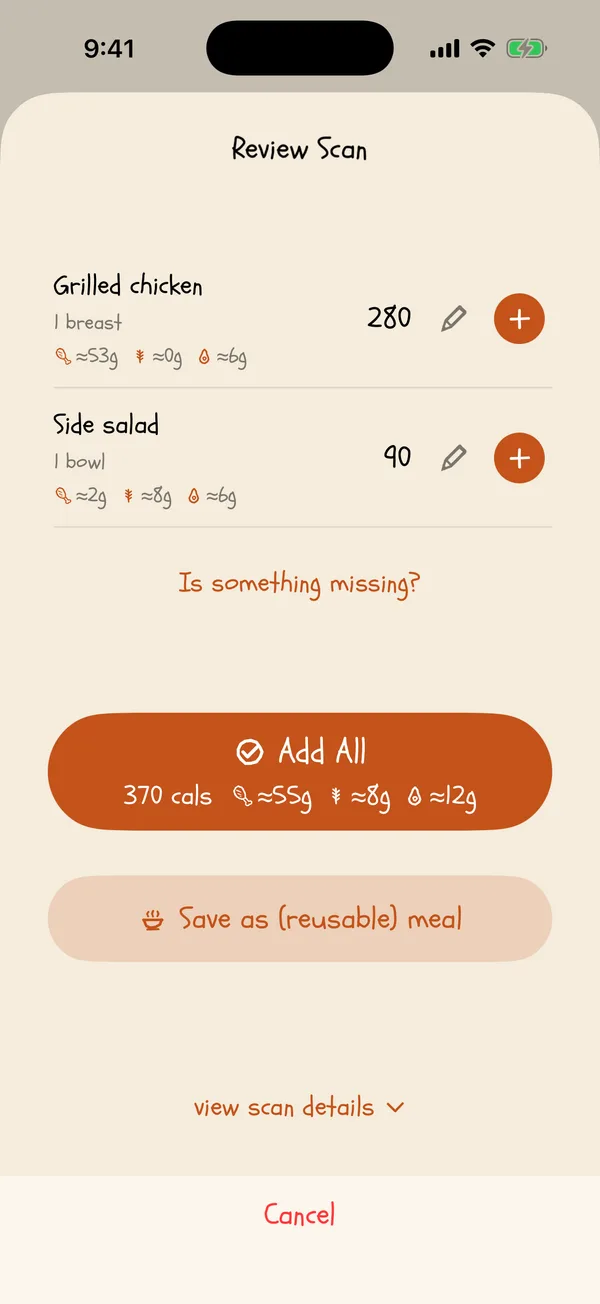
- Review Scan shows each food it found, such as "Grilled chicken, 1 breast, 280" and "Side salad, 1 bowl, 90", with protein, carbs and fat if you track them.
- Tap the pencil to fix a food or its amount, add foods one at a time, or tap Add All. Is something missing? adds anything the photo didn't show, like the oil it was cooked in, by search, barcode, voice or another photo. Save as (reusable) meal logs the foods and keeps them as a meal for next time.
What a photo can't see
A photo shows what's on the plate, not what went into it. Oil, butter, dressing and sugar are easy to miss, and portions are hard to judge from one angle. So treat each result as a starting point:
- Check the amounts, especially for rice, pasta, cheese, nuts and anything fried. Counting calories without a scale has common portions to compare with.
- Add hidden extras with Is something missing?
- For packaged food, the barcode scanner reads the label instead, and it's free.
Is the photo calorie counter free?
You can try it free: up to 10 free photo or voice analyses, until 100 regular foods are logged. After that it's part of Cave Cals+.
Cave Cals+ includes up to 30 photo and voice analyses a day and 300 a calendar month (on iPhone, Siri food estimates count too). See Pricing. If you're out of free tries, Cave Cals checks before anything is sent and shows Cave Cals+ instead.
What happens to your photo
Your photo goes through Cave Cals' server to OpenAI only when you choose to analyze it, to identify the foods. Our copies expire after 24 hours and are normally deleted within 48; OpenAI may keep information under its own policies. Your diary isn't sent, and progress photos are never sent to AI. Details are in the privacy policy.
Limits
- Results are estimates, and a photo can't see hidden ingredients.
- It needs an internet connection.
- If you'd rather talk than take a photo, Voice Log works the same way.
Sources
- Cave Cals on the App Store (accessed November 20, 2026)
- Cave Cals on Google Play (accessed November 20, 2026)